
New Revit Family Editor Course on lynda.com
I am happy to report that the first of my two new Revit courses on lynda.com is now available. The new course: Revit Architecture: The Family Editor includes an update to my Revit Family Editor Series DVD training and so much more!
The original DVD series covered the basics of the Family Editor for version 2010. This new lynda.com course expands greatly on the material included in the original series and updates the material for 2012. The original series was approximately 4 hours in length. This new lynda.com course is a whopping 6 hours and 44 minutes! In addition, the production quality available at lynda.com is far superior to what was produced in the original series. Given changes made to the Family Editor since 2010, the higher quality and expanded table of contents, I think you will find the new course a very worthwhile update to the original.
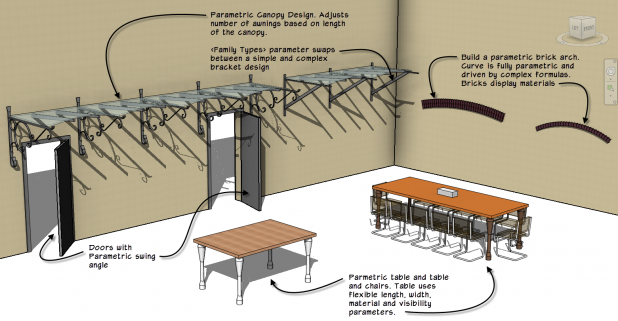
Revit Family Editor Course Highlights
Here is a snippet of the table of contents:
- 1. Introduction and high level concepts: covering what a Family is, the Revit element hierarchy, libraries and differences between model and annotation Families. Strategies and course focus are also covered.
- 2. Annotation Families: covering kinds of annotation, creating Generic Annotation and Tag Families and using Shared Parameters in Tag Families.
- 3. Simple Model Families: covering the overall model Family creation process, hosts and hosted, reference planes, constraints, labeled dimensions, work planes, flexing and testing.
- 4. Family Geometry: detailed look at: Extrusions, Blends, Revolves, Sweeps, Swept Blends and void form basics.
- 5. Beyond Geometry: includes coverage of identity data, Family Types, Type Catalogs, material parameters, visibility parameters and subcategories.
- 6. A Family in a Family: covering nested Families, Shared Families, Profile Families and parametric arrays.
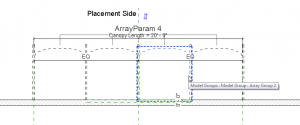
- 7. Controlling Visibility: explores symbolic lines, element visibility, level of detail display and controlling overhead display in plan.
- 8. Building Complex Parametric Families: begins tying together many of the previous topics to create a more complex whole. Covers planning, reference plane strategies, nesting components, arrays, parameters, formulas driving parameters and <family types> parameters.
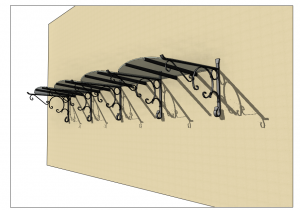
- 9. Parametric Annotation Family: ties together many previous topics to create a more complex annotation Family. A parametric key plan Family using conditional formulas to drive visibility is showcased.
- 10. Driving Angular Parameters: Controlling rotation and angles can be a challenge. This chapter uses a Door Family as an example to showcase how to parametrically control rotation and angular parameters.
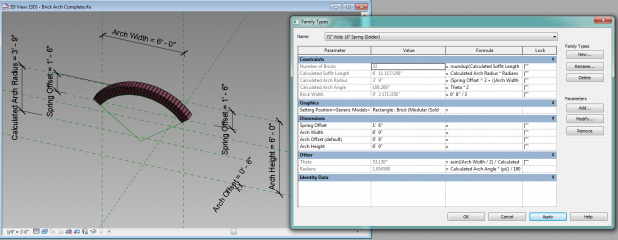
- 11. Advanced Strategies – Control a curve parametrically: Controlling curves can be a challenge. This chapter uses a brick arch Family to showcase how to parametrically control the flexing of curves in the Family editor. It also delves into advanced and complex formulas used to drive circle geometry. Advanced trigonomic functions are utilized to constraint the curve’s flexing behavior.
The This course is designed to get you up to speed with the Family Editor quickly. You can view a YouTube preview of the class here.
lynda.com library is a fantastic resource to learn a huge range of topics. With a large focus on creative software packages and topics, you will find tremendous value in not only the Revit course offerings but programs like 3ds max, Photoshop, MS Office, SketchUp and more. I hope you take a look at my new Revit Architecture: The Family Editor course today, and while you are there check out the other terrific courses that lynda.com has to offer.
Full disclosure: I receive a referral for each subscriber to lynda.com from the links on this site. I also receive royalties for my courses posted on the lynda.com site.
12 Responses to New Revit Family Editor Course on lynda.com
Comments are closed.
Categories
- Off Topic (1)
- Project Soane (2)
- BIM After Dark (Revit Kid) (2)
- Tips and Tricks (29)
- Oddities (5)
- Book News (23)
- Video Training News (7)
- Speaking Engagements (5)
- Renaissance Revit (12)
- Off Topic (8)
- Revit Concepts (1)
[…] Item of interest: Paul Aubin recently completed a new video course for the Revit Family Editor, hosted on Lynda.com. These are the families that get attention during the video which is 6 hours […]
[…] more and sign up for a subscription. While you are there, you can also??check out the??all new Revit Family Editor course that went live last month and??the Revit Architecture Essentials as […]
Thanks paul a lot with your lessons i can master revit architecture but all we need now is mass environment training series on lynda so then we will have complete list of revit architecture mastering.
more on the way soon. Thanks for your comment. I am glad you like the courses.
I am a member of Lynda, and loved the new series!
One question I had was, how did you link a material parameter to the parametric arch? It doesn’t work the same as any of the other methods you described.
Thanks in advance!
Hi Josh:
Thanks for the comment and for watching my lynda.com course. The Brick Arch uses nested Generic Model Families for the different kinds of bricks. Each of these Families has a Type parameter for Material. So when you change the kind of brick, you also change the material.
Look on the Project Browser, under Families and then under Generic Models. You’ll see the three types. Hope that helps.
Thank you Paul, I was able to modify it from there. I appreciate your response.
Your videos have been a life-saver for mastering Revit.
My pleasure. Thank you.
i like your video tutorials .
Thank you. So glad you like them.
ur tutorials are awesome i have ever watched. Its step by step answers and all. Here, right up at the top, there is new revit family editor course and is not available in youtube. Why??????
How long does it take?
Thank you for your comments. Very kind of you. You can find my video training at: http://www.lynda.com/paulaubin.
Thanks!